A fasting timer that explains, not pressures
Choose 12:12, 14:10, 16:8, 20:4 or your own length, and see your estimated stage in plain words.
- Pause, adjust or end anytime
- Honest stage explanations
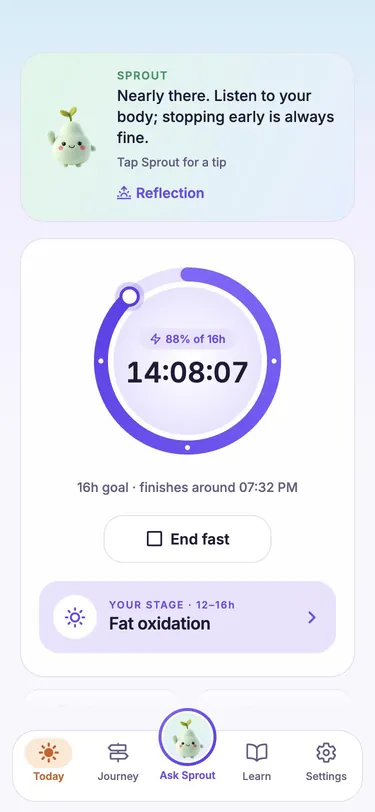
A gentle fasting timer with an AI companion that explains what's happening and never judges.
Free on iPhone · No account needed
What's inside
The essentials of intermittent fasting, made calm and clear.
Choose 12:12, 14:10, 16:8, 20:4 or your own length, and see your estimated stage in plain words.
What to eat to break your fast, or why you're hungry at hour 14. Friendly AI answers with the why behind them.

Log a meal with a photo and get a rough estimate you can edit. No calorie counting required.
Every fast at a glance, with your plan as a guide. No streaks to break, no red warnings.
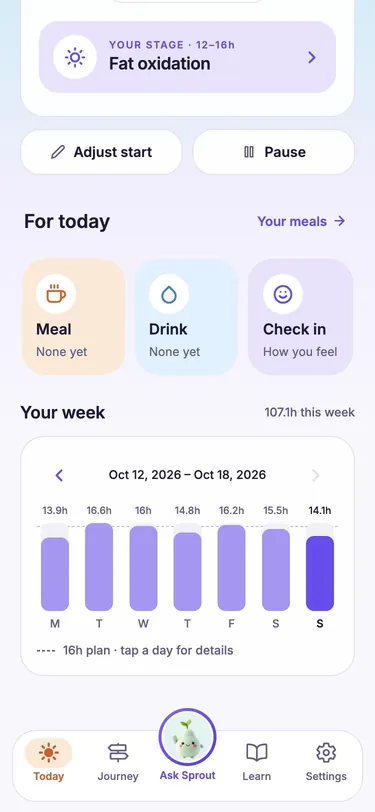
A short look back at your fasts, meals and how you felt, with one small next step. Written on your phone.
Optional nudges for fasting and water, with quiet hours so your phone stays calm while you rest.
Free on iPhone. Your first fast takes a minute to start.
Why Pause

How it works
Free on the App Store. No sign-up, no email.
Start with 12:12 or 16:8, or set your own length.
Your buddy keeps time, explains each stage and cheers you on.
Questions
Short answers to what people ask most.
Yes. Pause is free to use, with no paywall to start fasting and no subscription required.
No. You can start without signing up. Your fasts, meals and reflections are saved on your phone.
Popular rhythms like 12:12, 14:10, 16:8 and 20:4, or any custom length from 1 to 72 hours. You can pause, adjust your start time or end a fast whenever you need to.
Your buddy answers questions about food, hydration and fasting, explains what an estimated fasting stage means, and cheers you on. It offers general guidance, not medical advice.
No. Fasting is not suitable for everyone. Talk to a healthcare professional first if you are pregnant or breastfeeding, under 18, have a history of eating disorders, take medication or have a medical condition.
Pause is free on the App Store for iPhone.